Announcements

  1. Round up of recent updates

    Product update

    Hey everyone! 👋

    I hope your summer is off to a great start. I just wanted to share a few updates that have gone out recently based on your feedback! (Please keep the feedback coming! It matters...) And, give an update on what's in the pipeline.

    Recent updates

    • Time off requests - Your team can submit time off requests to be approved/denied. Once approved, they go on the calendar as blocked time and you'll be warned if you attempt to schedule that user during their time off. (Enable in the mobile version of ShootAssist)
    • General availability - This feature allows your users to specify the days of the week that they're available for work. Once specified, you'll be warned if you attempt to schedule that user on a day they aren't available to your team. (Enable in the mobile version of ShootAssist)
    • Standalone tasks - You can now create standalone tasks that aren't tied to a particular job. Great for tracking office work or other items that don't directly tie to a single job. (Easiest place to do this is from the menu on your dashboard)
    • Bulk email contacts - This is an improvement for the bulk email feature. Previously, you could bulk email your client's main email addresses. Now, you can select a contact type to email instead.
    • Flexible due dates for workflow tasks - You can now set due dates for workflow tasks and custom job tasks to be any number of days/weeks before or after the job date. Previously, it was a dropdown that only gave certain options.
    • Addresses for contacts - You can now store an address on individual contacts. Very useful for those who needed this functionality.
    • Merge token for client addresses - There's a new merge token for the client's address. Useful when you need to pull that information into an email from ShootAssist.

    Important reminder

    ShootAssist has mobile functionality! Currently, it's a web app you save to your homescreen. Once you've done this, it'll behave like a regular app, complete with push notifications for jobs you're assigned to, messages you've received etc. To get started, head to shootassist.com/schedule.

    What's next

    • Native mobile app - It's currently in development and will be coming to the iOS and Android app stores once completed. This is a very big project and I've been pretty heads down on it. Very excited to show you what I've been working on with this.
    • Time clock - In an effort to continue improving ShootAssist's workforce management features, I'm planning to introduce time clock functionality, complete with recording location, exporting reports etc. (I'm currently collecting feedback about what you need here, so please share any info about what you're currently doing and why it works for you.
    • Primary contact / Account owner for clients - For flexibility, I'm planning to add the ability to specify a 'primary contact' and an 'Account owner' for each Client. Both will open some new ways of communicating with your clients and your team.

    Just wanted to say thanks for being a ShootAssist user. I'm grateful for your business and excited to continue making ShootAssist better. Along those lines, please keep the feedback coming!!

    6

  2. Employee scheduling is here!

    Product update

    ShootAssist has long managed your schedule and workflows... So it was only a matter of time until it could also handle scheduling your team on those jobs. Starting today, that functionality is now available in ShootAssist (in beta).

    How does it work?

    When viewing a job in ShootAssist, you'll notice a new 'Schedule' section towards the bottom of the job overview page. This displays all events associated with the given job, and you can simply click the 'Assign' button to assign people from your team to that event.

    • When you assign or remove someone, they'll get an email letting them know
    • If the job's date is changed, all assigned users will get an email
    • Every day at 10am, anyone who's on the schedule for tomorrow will get an email reminder with a copy of their schedule.
    • The 'Schedule' section will show who's assigned to the job, and you'll also see names of assigned users on each event in the schedule.

    How can my team access it?

    We're introducing ShootAssist schedule, a mobile friendly web application for your team to view the schedule and any jobs they've been assigned to. (And a native mobile application is in the works). Here's what you need to know about ShootAssist Schedule:

    • If you log into ShootAssist on a mobile device, you'll be directed to this new interface by default
    • There's a new 'Field only' role that you can assign to any employees who should be able to access the new schedule feature without accessing the rest of ShootAssist.
    • You can access ShootAssist schedule from a computer by clicking the user profile menu in the header of ShootAssist and clicking the 'Mobile schedule' button.
    • Your team can bookmark this site, or save it to their home screen.
    • Make sure you go to Shootassist.com/settings/team to invite everyone from your team that should have access, and assign the role that makes sense.
    • You can access the new mobile friendly schedule at ShootAssist.com/schedule

    What information does it provide?

    The goal with ShootAssist schedule was to tightly integrate it with the rest of your data. Each job in the schedule shows nearly all information from the corresponding ShootAssist job and has full access to the note and custom field functionality of ShootAssist. Events are also color coded based on your job types from ShootAssist.

    I also know how important it is to be able to add jobs or events to your ShootAssist schedule while on the go, so the entire new job form has been revamped to work with ShootAssist schedule. Easily create, edit or reschedule jobs, all from a mobile device.

    What rules / protections are in place?

    We recently revamped user roles in ShootAssist to help protect your data and keep it private. This feature builds on those roles to give you control over what your team can do and see in ShootAssist schedule.

    • Users with admin or regular roles in ShootAssist will have full visibility and edit abilities in ShootAssist schedule. These users can see every job on the schedule regardless of if they're scheduled on it or not.
    • Read only and 'Field only' users will not have the ability to edit data and will only be able to see the jobs they've been assigned to. These users cannot see the rest of the schedule.

    What's next?

    This is just the start! Please share your thoughts as you give this feature a try. Also, here are some things on the roadmap for ShootAssist Schedule:

    • Ability to message the users assigned to a particular job
    • Ability to send 'announcements' to your whole team
    • Ability to host and share files for your team to access, such as lighting diagrams or documentation
    • Ability to handle things like shift swaps / time off etc
    • Native mobile app to replace the web app functionality

    9

  3. User permissions, field reports & more...

    Product update

    ShootAssist got some shiny new features and a few useful updates. Make sure to read this update in it's entirety so you can take full advantage of everything that's new.

    User permissions

    This has been a highly requested feature that's all about protecting your data and giving the right level of access to your team. ShootAssist now supports permissions for every user you invite to your team. There are 3 options to choose from and you can change a user's permissions by going to Support --> Team --> Users. Here are the 3 permission levels:

    • Admin: Full access to the system, including financials and team settings
    • Standard: Full access to the system, excluding financials and team settings
    • Read only: No edit access, other than the ability to mark tasks as complete.
    6

    Improve User Permissions

    Expand user permissions system so certain actions can only be performed by admins. This could also apply to information. (ie Financial data is only visible to admins). The goal being that certain information is extremely important and should be protected. This would help protect who could edit data, cancel / reschedule jobs, change contact info, update automated emails etc. This could include the introduction of more user roles or just the introduction of more policies around the existing roles. Open Questions: What actions should be protected? What data should be hidden? What levels of Admin would you expect?

    Andrew Vernon
    Shipped

    2

    Field reports

    Ever wished you could standardize the internal info-share after a job has wrapped up? Now you can... Simply direct your team to ShootAssist.com/report where they can fill out a very simple form to share how the photoshoot went. (Logged in users can report on any job that happened on that day or the previous day) The results will be emailed to your team's owner, and will be saved as a note on the corresponding job. There's also a new merge token for referencing the report url in automated communications.

    8

    Add ability for Photographer to submit a "Shoot Report" at the end of a shoot

    We have our lead photographer at each site send in a "Shoot Report" at the end of the day. (currently in google forms). This allows us to know lots of info that would otherwise be lost. Follow ups for the client such as. "the secretary asked for a second set of staff IDs. Or facility info for the future shoots ie. the beaker to turn on the lights is here ... I would love a way to put these into shoot assist.

    Nick S
    Shipped

    0

    One-off tasks

    Ever wished you could assign a custom task to someone on your team? Previously, every task had to be associated with a job. But now, you can create standalone tasks and assign them to any member of your team. Assigned tasks appear on that member's dashboard and if they have notifications turned on, they'll receive an email letting them know a task has been assigned. You can create a custom task from the Dashboard or from the list of tasks on /jobs.

    3

    Add misc task for employee

    It would be nice if you could create a misc task not really related to any job that you could assign to an user.

    JR M
    Shipped

    2

    Email signatures

    It can get a little tedious to make sure all of your automated emails have the same email signature. And, downright annoying if you need to update the signature across all of your emails. So, I've introduced a new Email signature merge tag, and the ability to set your signature once under Settings --> Preferences. Here's to some easier consistency across all of your emails!

    Things I'm thinking about

    • Mobile! ShootAssist needs to be more accessible on mobile devices
    • A recent feature request to select a 'Primary contact' on each job. This could potentially be an optional field, but would open the door to specifying who the specific contact is for each shoot and would allow for things like First name / last name merge tags.

    Other improvements

    • Updated workflow report page that significantly improves load time while allowing you to view more than one job type at a time.
    • Better, faster filtering and overall load time for your job list
    • A new /jobs tab to see just your upcoming jobs (this is the new default tab)
    • Updated searchable dropdowns for most places where you need to select something
    • Clearer notations for required fields and tooltips when a field's usecase might not be clear
    • Began work on a cleaner, easier to read visual identity including colors / fonts
    • Improved nearly every quick action menu with clearer options
    • Created clearer communication around how to 'Sync' shootassist's calendar with your calendar.
    • Fixed a bug related to adding additional days to a job
    • Fixed a bug related to setting your job's address
    • Fixed a bug related to how dates were represented on the calendar for newly created jobs

    2

  4. Custom fields, job memos and dashboard updates

    Product update

    I'll be honest... I've been looking forward to this update for a while. ShootAssist got several big new features that I'm hopeful will improve your overall use of the system and increase the value it brings your team! A massive amount of effort went into these and I'm excited for you to try them out.

    Custom fields!

    ShootAssist now supports custom fields! Create fields for the info that's most important to your team or workflow and store it on a per job basis.

    • Custom fields can be created in Settings (Settings -> Templates -> Custom Fields)
    • Info from custom fields can be used in all automated communications
    • Info from custom fields can now appear in the event notes of your calendar or crew.
    • Add only the custom fields you need to any job
    • Custom fields can be added to a job from quick actions or the job setup form.
    • Once custom fields exist on a job, they appear near where flagged notes appear
    • Click a custom field to edit or delete it

    Job Memos

    Sometimes you need to be more descriptive about a particular job than just assigning a Job type. For instance, with a school sports job, you need a way to easily say what sports are being photographed. This can now be done through the Job memo field!

    • Assign a memo from the job setup form.
    • Memos appear alongside the job title on your calendar, job list, job overview page and in your calendar feed and Crew.

    Agenda + Updated widgets on the Dashboard

    The dashboard should be as actionable as possible, only showing the information you need to see most. And, this update was aimed at moving it in that direction.

    • New widgets give a count of jobs (This week, Today, Tomorrow, To Confirm)
    • The agenda has smart sections that appear / disappear only when they have info to display
    • Past due tasks shows just that, and can be filtered to tasks assigned to you or tasks assigned to your departments.
    • Jobs this week is a short and sweet list of just the current week's shoots
    • Tasks this week is the same, but for tasks and can be filtered just like past due tasks
    • Jobs to confirm shows unconfirmed jobs within a certain timeframe (more on that below)
    • Upcoming jobs is a scrollable list of all jobs from next week and beyond

    Other New Features

    • Customizable calendar notes. You can now write your own calendar event notes using the same merge tags you write automated communication with. (Including merge tags for your custom fields). ShootAssist will use these notes to populate your Calendar feed events and also the events that appear in Crew allowing you to have more control than ever over exactly what information is shared with your team. Head to Settings -> Calendar to customize your note.
    • New Merge Tags. Alongside calendar notes, I've added some additional merge tags for you to use everywhere they're supported in ShootAssist. They include Arrival time and Flagged notes. And of course, you'll see merge tags for any custom fields you create.
    • Calendar settings. There's now a Dedicated place in settings to customize your calendar. Decide if weekends show, what day the calendar should start on and how many days in advance ShootAssist should be reminding you to confirm jobs.

    Improvements

    • Better sort logic for workflow tasks. There were some edge cases where a task from the delivery stage of a job could appear before tasks from the production stage. This logic got a workout and should be behaving a little better. You may need to sync your workflows for the new logic to kick in.
    • Workflows now warn you when they need to be synced. A common confusion for new users is that changes they make to their workflow templates don't automatically show up on live jobs. This is by design to prevent any accidental changes, but it wasn't always clear you needed to sync. ShootAssist now does a much better job of alerting you when your changes need to be synced to your live jobs.
    • Better logo sizing in outgoing emails. In some cases, the logo that appeared in your emails could be much larger than desired. This only happened when your client's email software ignores the image CSS but was happening often enough to be annoying. ShootAssist now keeps a resized copy of your logo specifically for email purposes which should make sure things are always the right size going forward.
    • Quick search is now more accurate. In some rare cases, quick search would navigate to a different record than desired. It's gotten a stern talking to and has promised to behave going forward.
  5. Keyboard shortcuts, calendar printing and more!

    Product update

    New Features

    • The quick search menu is now keyboard shortcut friendly! (Video Intro)CMD+K (Control+K for PCs) will open / close, you can immediately start typing the client or contact you're looking for and hitting enter will take you there. You can also select different items in the list with your arrow keys.
    • [Beta] Print out your ShootAssist calendar! I'm looking for feedback on this one. Simply head to your calendar and click the settings icon (top left). It'll print whatever view you're currently looking at.

    Improvements

    • Flagged notes & arrival times for multi-day jobs. Flagged notes and arrival times will now copy to the event notes of all days associated with the job in both Crew and your calendar feed.
    • Double click a date to create a job. For many, the calendar in ShootAssist has been a little too touchy. Accidentally click a calendar date, and ShootAssist would race to help you create a job for that date. To calm things down, this now requires a double click.
    • Faster financial reports for Clients and Vendors. Revenue reports on your client and vendor pages are now much faster at calculating and displaying relevant data.

    Fixed

    • Large logos in outgoing emails. I've gotten some reports that your logo is sometimes unexpectedly large in outgoing emails. This has been a difficult one to track down, but I've pushed some updates that should help. If you've experienced this, please upload a fresh copy of your logo in Settings --> Team and let me know if you see this again.
    • Logic to prevent against invalid end dates. I've periodically gotten reports of jobs not showing up in Crew, your calendar feed, or the calendar inside of ShootAssist and believe I've tracked down the issue. In some cases, ShootAssist was allowing photographers to enter end dates that came before start dates chronologically. Since this isn't actually possible, api calls to services like Crew, and logic to display the date on a calendar would all fail. :-/ But rest assured, ShootAssist is now keeping an eye out for this issue and will warn you if your end dates need a second check.

    On my mind / Feedback needed

    As I'm working through new features or current builds, I would love your feedback. Here are some of the things I'm working on or planning. Please consider clicking on the ideas below and sharing any relevant feedback.

    3

    Add Custom Fields for storing additional information

    ShootAssist stores a good amount of information already, but I'm frequently getting requests for more fields. While I could certainly add dedicated fields, it seems apparent that what might make the most sense is the ability for you to add your own fields and store the information that is most important to you. Open Questions: Would you most want information stored with a job, client or job type? Would you need this information to be available as merge tokens in automated emails? How many fields do you anticipate needing? (I'm targeting a limit of 5-10)

    Andrew Vernon
    Shipped

    1

    6

    Improve User Permissions

    Expand user permissions system so certain actions can only be performed by admins. This could also apply to information. (ie Financial data is only visible to admins). The goal being that certain information is extremely important and should be protected. This would help protect who could edit data, cancel / reschedule jobs, change contact info, update automated emails etc. This could include the introduction of more user roles or just the introduction of more policies around the existing roles. Open Questions: What actions should be protected? What data should be hidden? What levels of Admin would you expect?

    Andrew Vernon
    Shipped

    2

    17

    Client Digital Contract/Agreement

    It would be helpful if you could send agreements/contracts to clients and have them e-sign them.

    Sammantha Herbaugh
    Under consideration

    4

    4

    White label portal for your clients

    This could allow your clients to see what jobs they currently have scheduled with you and request to make changes to the contact info you're using within ShootAssist for their account. In addition, this could potentially support file uploads, sharing info with your clients, getting feedback etc.

    Andrew Vernon
    Under consideration

    0

    6

    Lead tracking tool

    ShootAssist could offer a new feature that allows you to track any leads you're currently selling to and where they are in your sales process. It would be easy to convert a lead to a full client account and this feature could eventually utilize ShootAssist's automated communication features to reach out to these clients on your behalf.

    Andrew Vernon
    Under consideration

    0

  6. Arrival time, Clearer rescheduling, better job creator & more

    Product update

    I'm excited for this update because of how many of the features came directly from some of you! Many of these features are targeted at better quality of life in ShootAssist. With that, let's jump into what's new in ShootAssist.

    Feature Requests, voting, roadmap and announcements

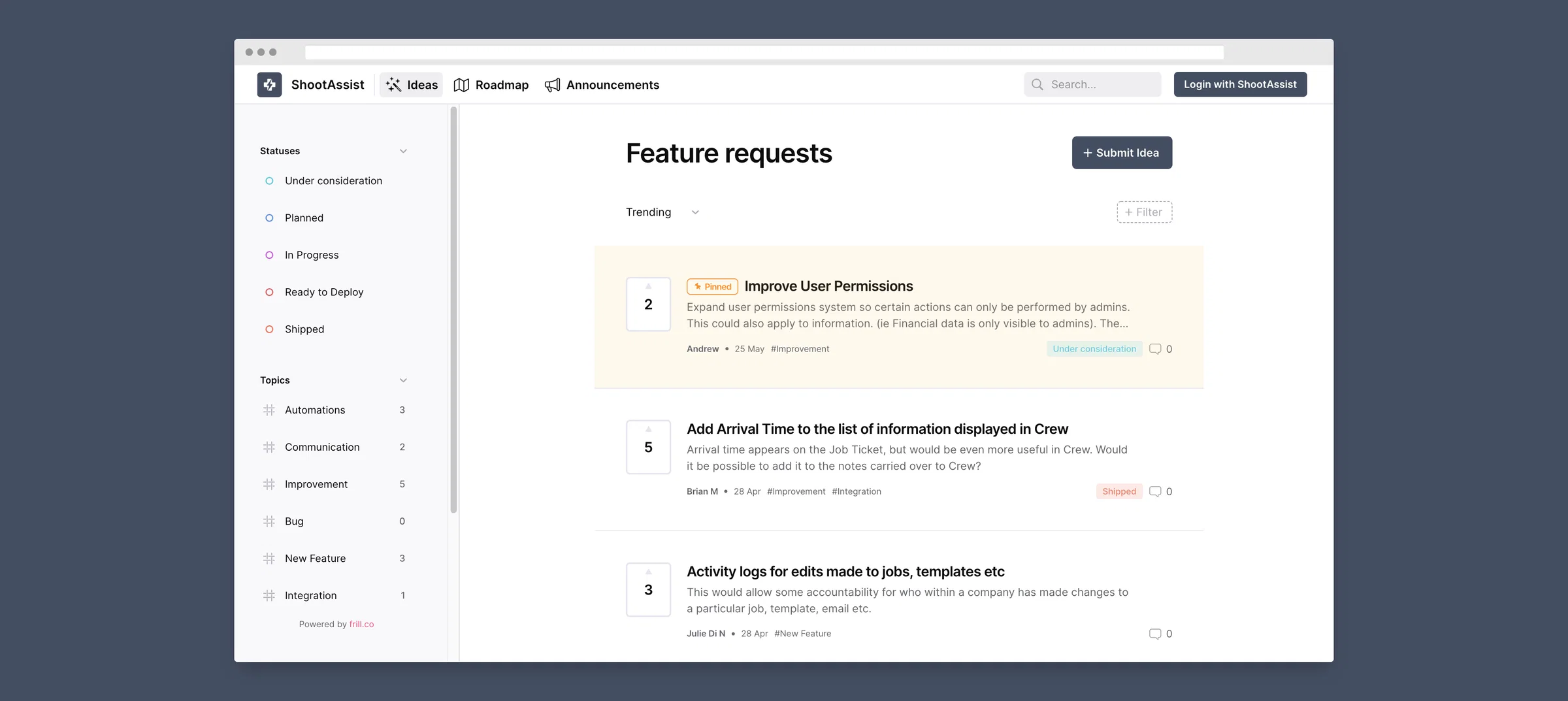
    I'm now using a feature request and tracking platform! Anytime you have a feature request, or want to see what others are requesting, simply click the blue bolt widget in the bottom right of your screen. From there you can share ideas, comment or vote on ideas from others, see what I'm working on and get updates about the latest releases. Thanks in advance for the ideas!

    screely-1651540550049

    Better info in Crew and Calendar feed events

    Up until today, events in the calendar feed ShootAssist creates have only had a link to the job. But now, they have all the same information that's availabe in Crew. This includes number of cameras, shoot location & address, start time and the contents of a flagged note if one exists. In addition, both Crew and the calendar feed's events now also display an arrival time which is the job's start time minus the job type's set up time. (Set in Settings)

    2

    Update Calendar feed to have the same event notes that are sent to Crew

    Currently, the calendar feed events only have a link to the job in ShootAssist. But, it would be more useful if they had all the same info that's sent to Crew including start & arrival times, an address, shoot location, number of cameras etc.

    Andrew Vernon
    Shipped

    2

    3

    Add Arrival Time to the list of information displayed in Crew

    Arrival time appears on the Job Ticket, but would be even more useful in Crew. Would it be possible to add it to the notes carried over to Crew?

    Brian M
    Shipped

    0

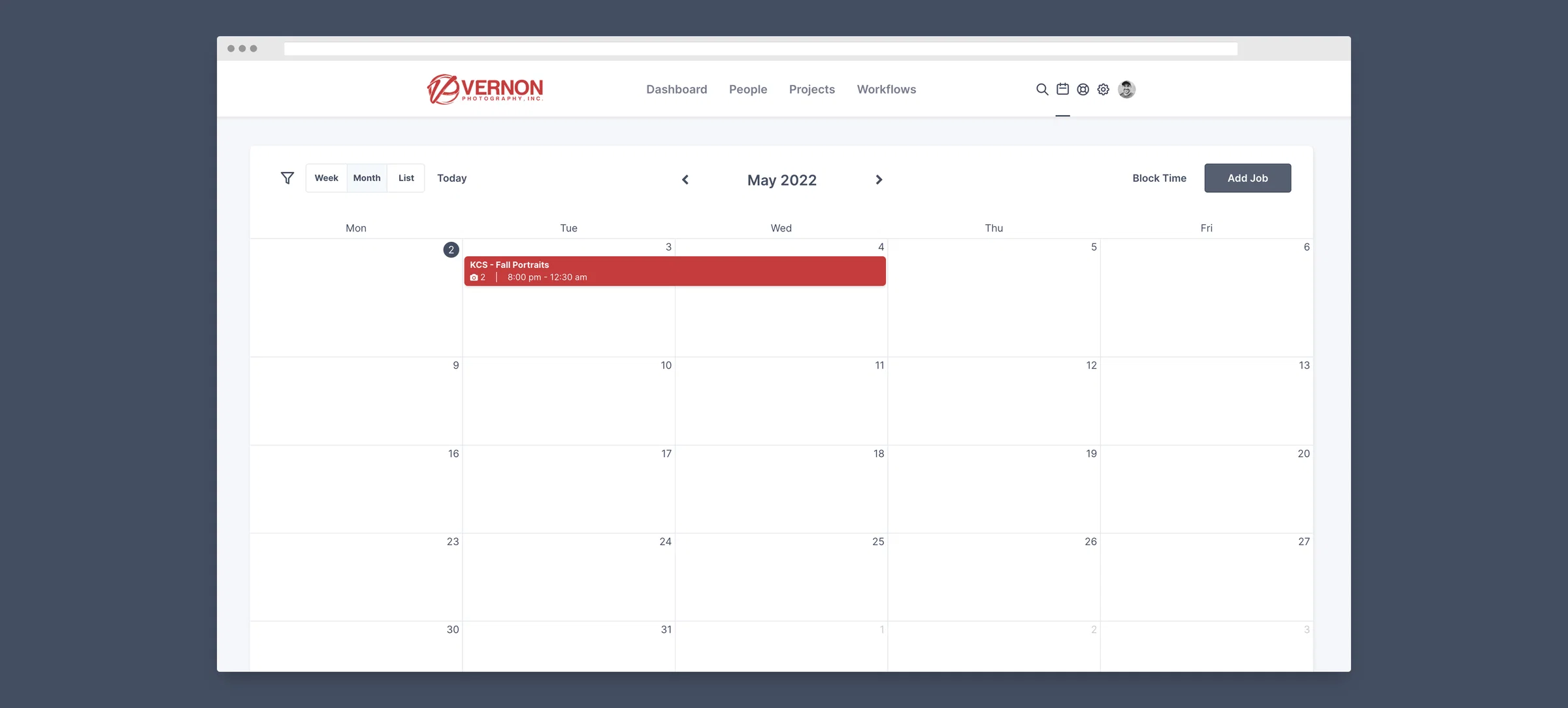
    ShootAssist now better supports jobs that go overnight

    One issue that's crept up from time to time is that ShootAssist didn't handle overnight dates very well. As a result, they sometimes wouldn't display correctly on the calendar or in the calendar feed. This has now been corrected so that ShootAssist can fully support all those midnight prom and candid events. Have fun!

    1

    Make it possible for a single job to start on one day and end on another.

    Currently I can have multiple days as part of the same job, but there isn't a way to schedule a job where the shoot starts on one day and goes overnight into the next day. This would be very useful for proms and other events that go overnight.

    Danny R
    Shipped

    0

    screely-1651540674400

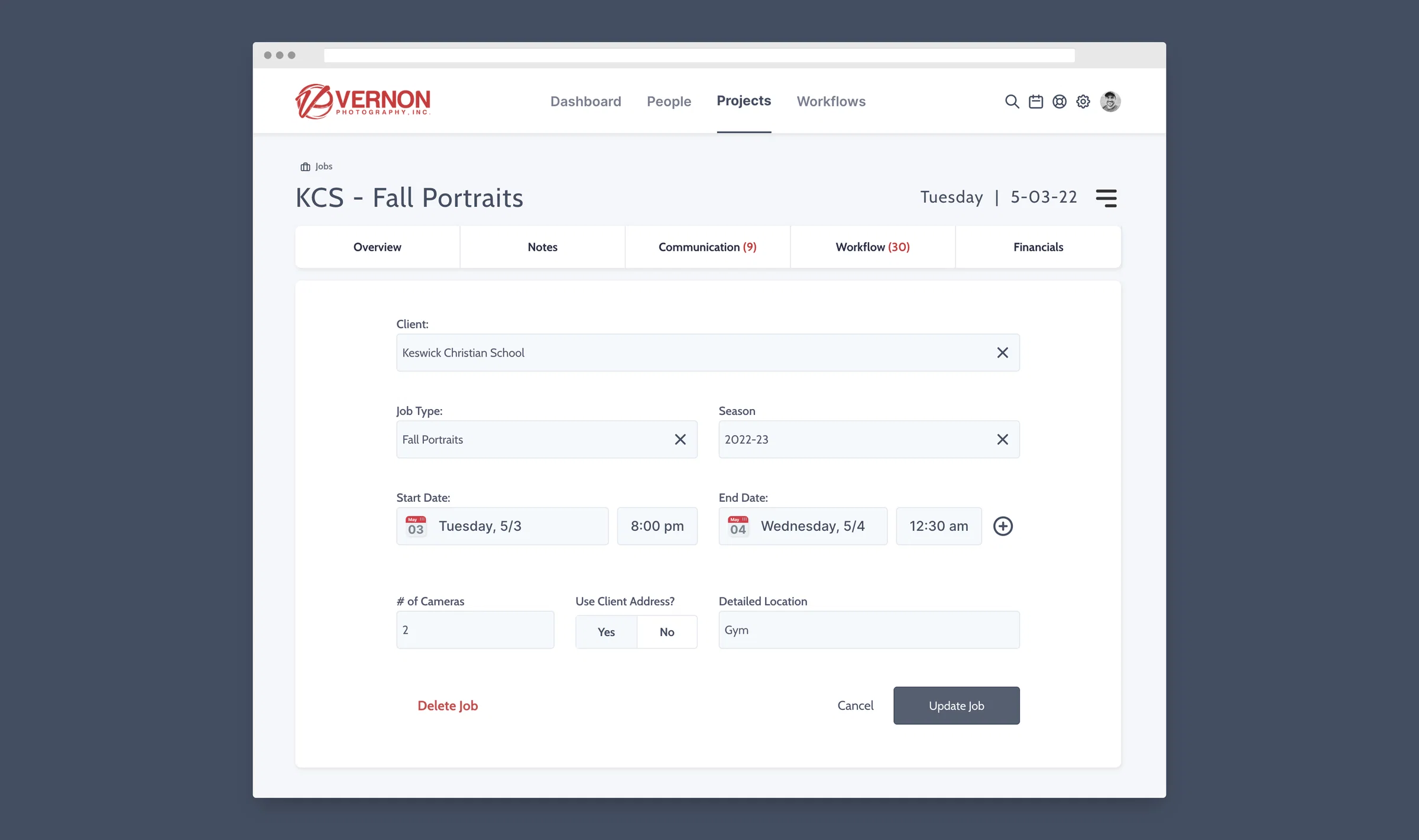
    Revamped form for creating & updating jobs

    Building on the recent updates to the Client, Job Type and Season input fields, I've now completely revamped the job creation and update form. Those fields can now act as dropdowns or as quick search inputs and if the right record doesn't exist, you can create it while on the form without having to go into your settings. You'll notice the date selector is also new and gives full control over the start and end date AND time. Finally, those pesky toggles that led to some confusion are now updated with much simpler and easier to understand selectors for yes/no. Here's to creating and updating your jobs much faster than before.

    2

    Make Job Type and Season a Drop Down Box

    Both the Job Type and Season used to be a drop down box when creating a new job. This has changed and you only see your job type options and season options when you start typing. We are concerned that this may lead to duplicate job types or seasons. Can we add the drop down box back?

    Brian M
    Shipped

    2

    screely-1651540734744

    Confirmation when dragging events on the calendar

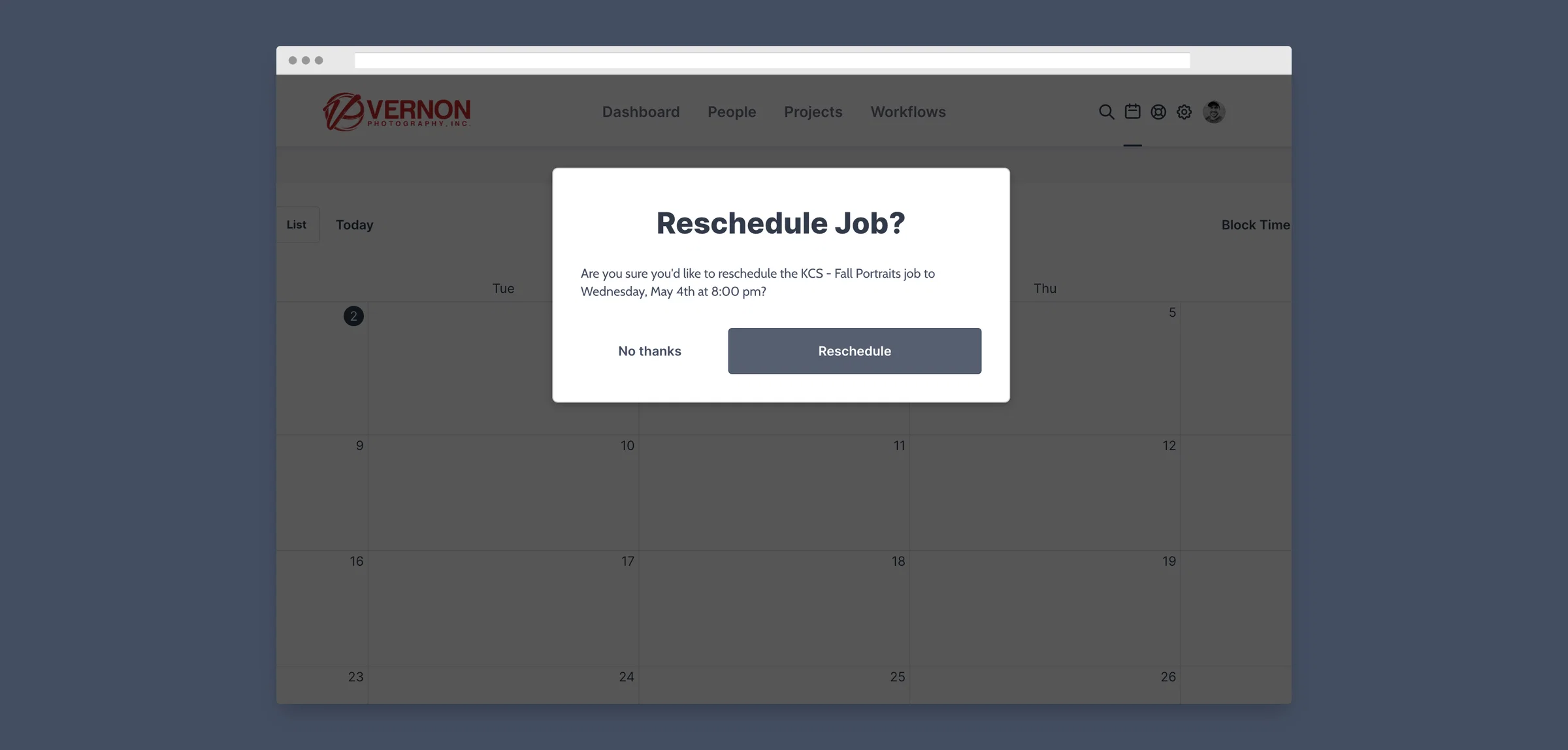
    We've all been there... You accidentally drag an event on ShootAssist's calendar and it's immediately rescheduled to the new date. Major bummer. ShootAssist will now show a popup with the proposed date and time and allow you to cofirm the change before moving forward with it. #nomoremistakes

    screely-1651540805664

  7. Email just got a major upgrade

    One of the best features of ShootAssist is it's ability to automate your client communications. And it just got way better.

    Verify your own domain

    Up until today, ShootAssist sent emails using Hello@ShootAssist.com with a reply-to set to your studio's info. This is relatively common practice, but has a couple drawbacks. First, as spam filters get more strict, this approach can sometimes cause lower deliverability scores. And, if your client's email provider doesn't support replying to the reply-to address, their replies to hello@shootassist.com would bounce back.

    But now, you can verify your own domain which allows ShootAssist to send emails directly from your address. This greatly improves deliverability and will mean all replies go directly to your address. You can set this up here. The process will allow you to register a domain and there will be two DNS records for you to update with your domain registrar. Once verifying those records, things will be ready to roll.

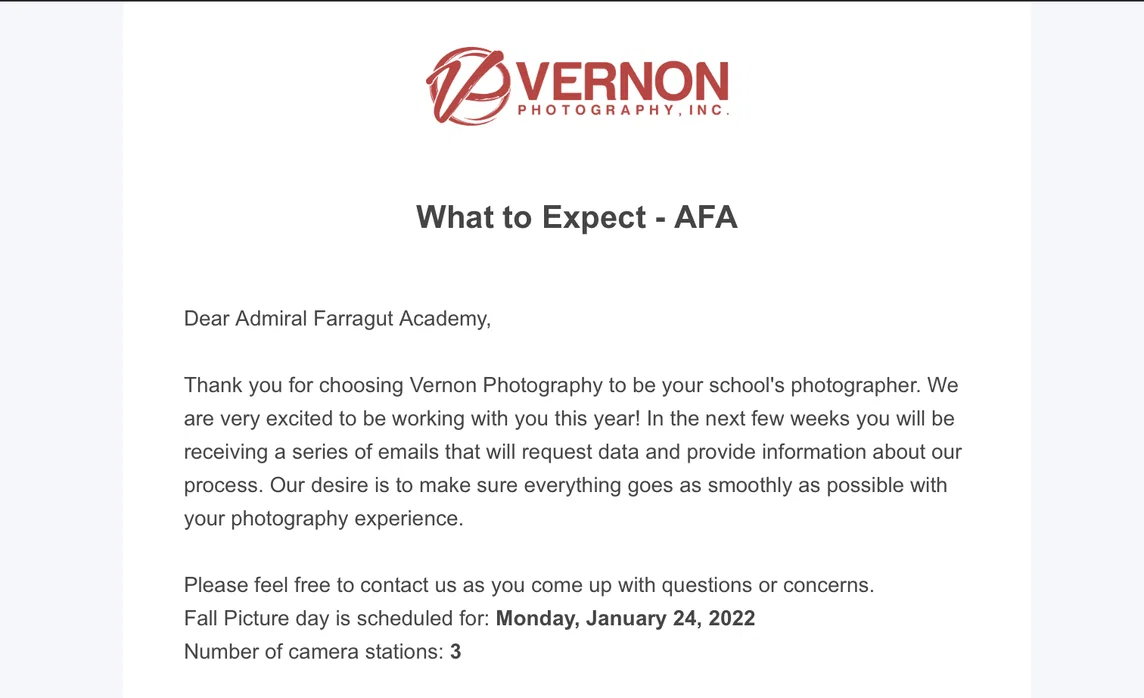
    Clean & branded email template

    Previously, all of ShootAssist's emails were simply text based. This worked well, but didn't provide much in the way of branding or recognition with your clients. Starting today, all emails sent through ShootAssist arrive in a beautiful email template branded with your logo, company name and address.

    You can see what the new template looks like by going to your Job Type settings and sending a test email (more on this below).

    Screen Shot 2022-01-21 at 10.25.41 PM

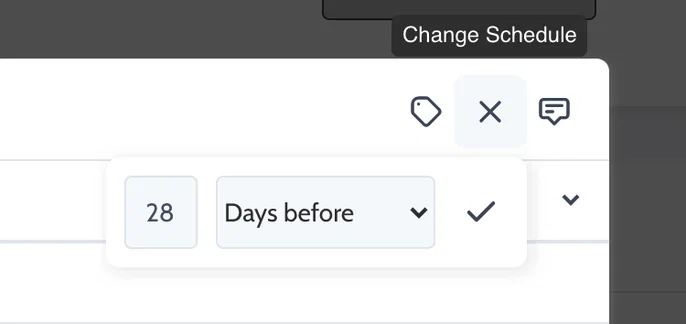
    More dynamic send dates

    ShootAssist now allows you to simply type a number and then select days before, weeks before, days after or weeks after. No more selecting from a pre-defined list. When you create a job, ShootAssist will automatically schedule the emails based on your selection.

    Screen Shot 2022-01-21 at 10.29.00 PM

    Customize the To: field by contact title

    Prior to today, all automated emails sent to the email address on file for the school and you had the option to cc contacts by title. But, you can now address your email directly to a contact by title. (ie Principal, AD etc)

    The way this works is that ShootAssist will search for any contacts, associated with a job's client, who have the title you specify. If it finds someone, the email is sent to them. If it doesn't, it will fall back to the client's default email address.

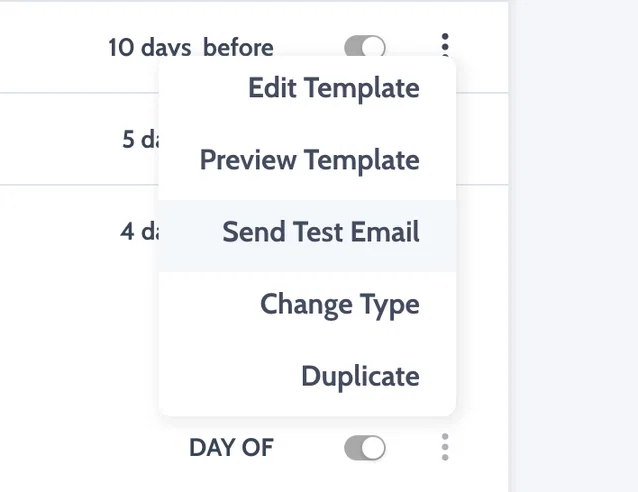
    Easily toggle email templates on or off

    Have an email you only send to some schools for a particular job type? Or, need to stop emails for any reason? You can now toggle your templates on or off from your Job Type settings. This instantly disables the corresponding emails for any related jobs. Toggle it back on and they instantly resume on whatever schedule you selected. You can also go to jobs and manually send these emails if you simply want more control over who gets them or when they're sent out.

    Screen Shot 2022-01-21 at 10.44.46 PM

    Send yourself test emails / messages

    Nobody wants to set up a test client and job just to check their emails. While working on your email templates, click the three dots and send yourself a test at any point. ShootAssist will fill the merge tags with demo data and send the email to your email address so you can check things out.

    Screen Shot 2022-01-21 at 10.45.10 PM

    New merge tokens! (Prepay & Proof links along with an end time token)

    Merge tokens allow you to write your templates in preparation for them to be merged with live data about your job or client upon sending. There are quite a few, but it seemed helpful to add a couple more.

    We've now added prepay and proof link tokens which have a handy trick up their sleeve. You can save prepay or proof urls to your Clients directly or to your job type. And in the job type settings, you can choose if ShootAssist should reference the client links or the job type links. Upon sending an email with one of these merge tokens, ShootAssist will look where you tell it to pull the info. Super helpful for situations where each client might have a unique ordering url, or where you have one URL that you'll use for all clients with a particular job type.

    End time is more self explanatory. There are times where it's helpful to be able to spell out a planned end time and now you can.

    In addition, the job date merge token has been updated to accurately represent the dates if a job will take place over more than one day.

  8. Minor features with big effects...

    Things have been a little quiet while I've been working on some bigger updates for ShootAssist. But, there have been plenty of smaller features worth mentioning. One of my goals is to constantly make ShootAssist better and many of these features were targeted at exactly that.

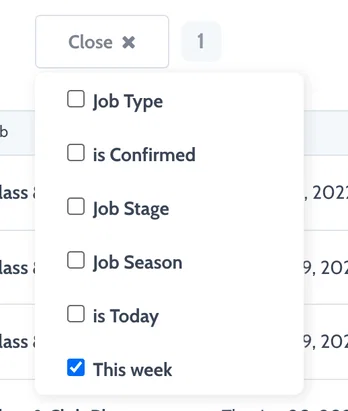
    This week filter for your project list

    Often there are times where you want to quickly see only the shoots that are happening this week. Now, you can filter down to just those jobs in just 2 clicks. Visit your projects page, click the filter dropdown and select 'This week' to check it out.

    Screen Shot 2022-01-18 at 7.38.09 PM

    Hide weekends on your calendar

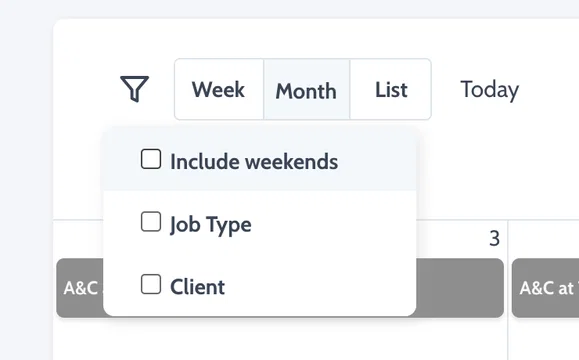
    Weekends take up a good portion of the calendar viewing area. If you don't shoot on the weekends, you can now hide them to give more space to the rest of the week. ShootAssist will remember your preference and save it for next time too. Toggle weekends off in the filter menu while viewing the calendar.

    Screen Shot 2022-01-18 at 7.41.20 PM

    Simple notes / Descriptions for your tasks and their templates

    Easily give instructions, leave notes, provide context etc on tasks or their templates. Any notes you write on a task template will be carried over to all tasks created from the template. But, you can easily overwrite, update or change those notes on a per task basis.

    Screen Shot 2022-01-18 at 7.46.21 PM

    It's now easier than ever to see when a job has multiple dates

    No more guessing which jobs have multiple dates. You can now easily see all dates represented in your job list, on your job page and even in your automated emails... (more on that soon)

    Screen Shot 2022-01-18 at 7.55.29 PM

  9. ShootAssist just got employee scheduling superpowers!

    One of the first things most new users ask about is how to schedule employees on the jobs they're handling in ShootAssist. And, it makes sense! ShootAssist stores your job, workflow and client information so it would be the ideal place to also handle employee scheduling.

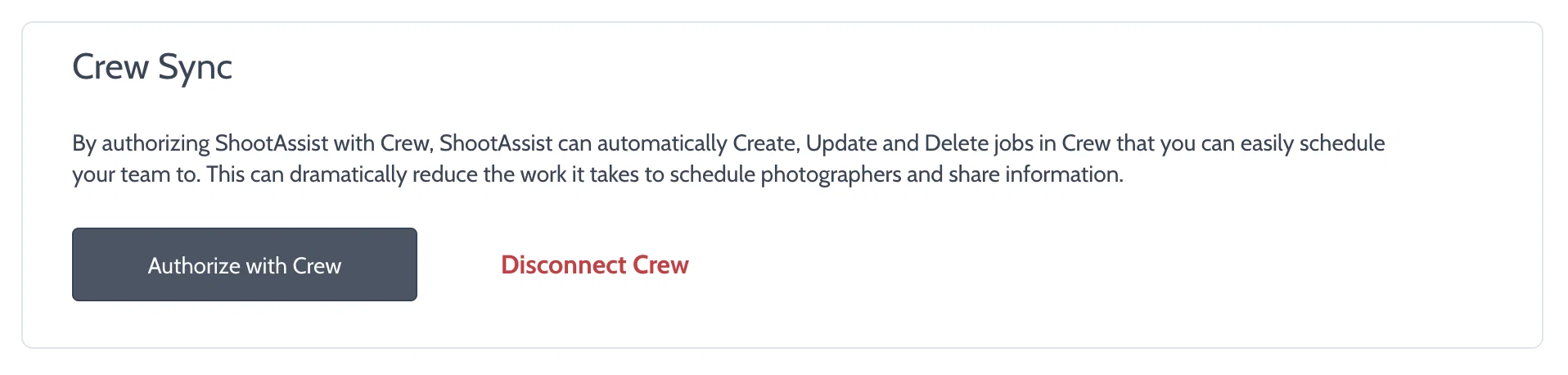
    Long story short, I've integrated with Crew to bring Employee scheduling to ShootAssist and the integration went live today!

    So, why Crew? I'm a nerd for software that does it's job really well, is simple, and fits volume photography in particular. In testing a whole bunch of solutions, Crew was the best solution we found at Vernon Photo. They offer iPhone, Android, Mac and web apps so it's super accessible for your employees and they offer Event based scheduling instead of shift based. For volume photography, this is the deal breaker for most tools on the market. It's a pain to create 4 shifts for the same job just to assign 4 people. With Crew, you create one event for a job, and then assign however many employees you need. They get access to the job details, can chat with other employees assigned to the job and can even find replacements for themselves if they're not able to cover the shift. And, that's just the start! You can host files there like lighting diagrams or SOPs for your employees to access on the go, you can track time, give feedback, send team-wide updates, request shift covers, share surveys and more.

    Where does ShootAssist fit in? Once you integrate ShootAssist with Crew, any jobs you create in ShootAssist will be pushed to Crew with all pertinent into: Job type, Client, Start time, Address, Notes, What room / location at the Client's address etc. And, if you reschedule or delete a job, ShootAssist will make those changes for you as well.

    Create and manage job in ShootAssist, simply assign employees to the job in Crew and you're good to go! To get started, make sure to set up an account in Crew. Then head over to Settings / API and click Authorize with Crew.

    Screen Shot 2021-05-24 at 9.36.41 PM
  10. Meet the new Automated Communication Timeline!

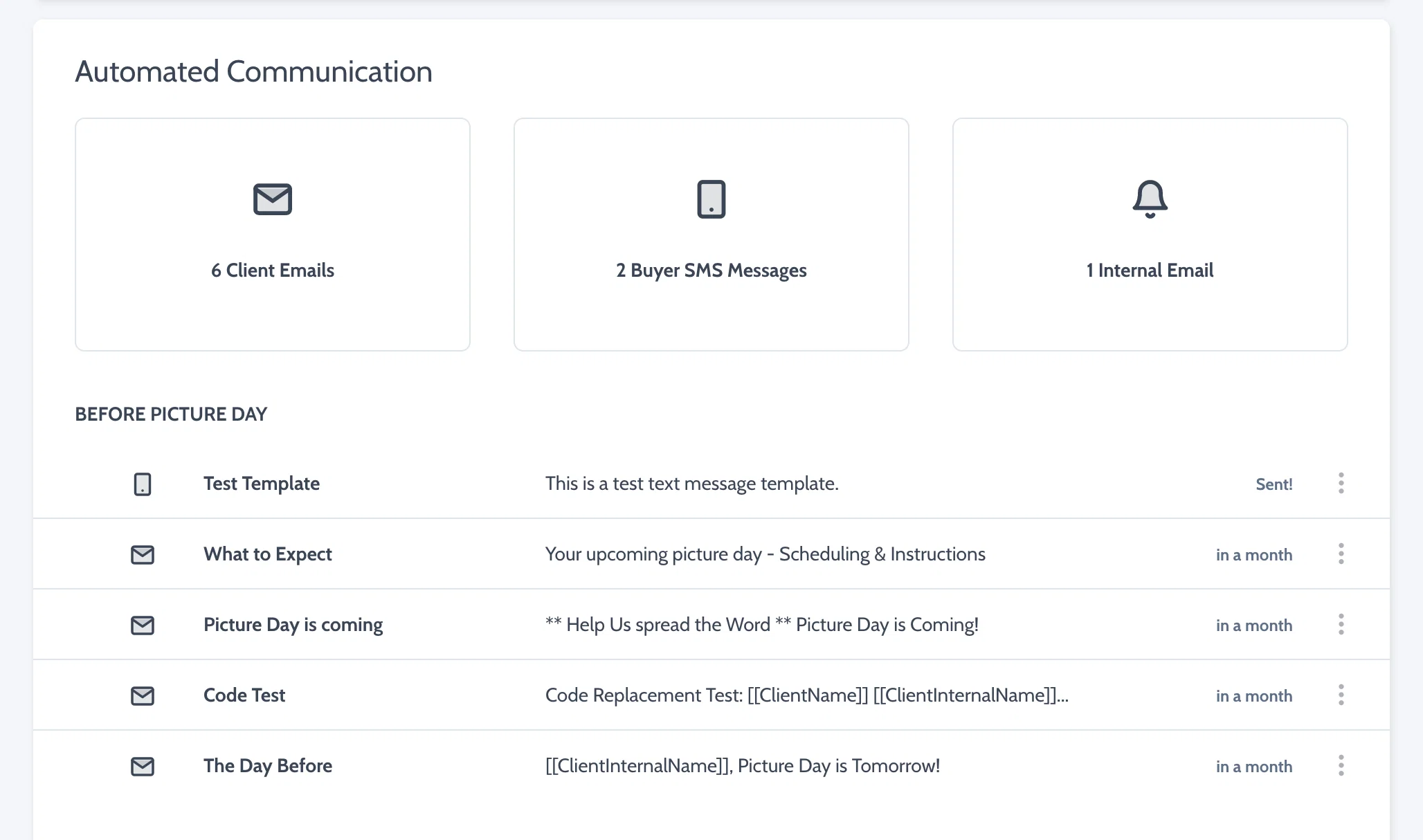
    ShootAssist has been able to automate Client Emails and Buyer SMS messages for a little while now, but the display of those communications and their timeline has been segmented. This has made it difficult to really understand the timeline of communication events around a Job's date. But, not any more.

    The new timeline will display Client emails and Buyer messages in one view and will segment things into the communication that happens before, on and after picture day. This also opens the door for adding new communication types which I've used as an opportunity to introduce Internal Alerts.

    Internal alerts work exactly like Client emails in how they're sent automatically using merge tokens. But, they'll send to your studio's email address instead of to the Client. These should be quite useful for reminders, notifications etc and, I hope to add more communication types in the future.

    Screen Shot 2021-05-24 at 9.19.34 PM